Steps to delete
Reports nobody reads, approvals that approve everything, forms that duplicate other forms. Deleting a step costs nothing and can never break.

Forward Konnect maps how work actually moves through your company — scheduling, onboarding, approvals, document handling — then automates the handoffs where things stall. The process gets fixed before any software gets bought, so you automate a good process instead of speeding up a broken one.
No obligation. Local guidance. Response within one business day.
Every growing company hits the same wall: the informal way of doing things — ask Maria, she knows — stops scaling somewhere around the tenth employee or the second location. Work still gets done, but it gets done differently every time, it stalls whenever a key person is out, and the owner becomes the routing desk for questions that a process should answer.
Business process automation is for companies at that wall. It applies wherever work follows a repeatable path: service businesses juggling appointments, firms onboarding new clients, operations teams pushing approvals and paperwork between people. If your team's answer to "how does this get done?" starts with "well, it depends who you ask," you are the audience.
When "how does this get done?" depends on who you ask, the process is ready to be written down.
There is a rule we refuse to break: automating a broken process just produces mistakes faster. So every engagement starts with mapping, not tooling.
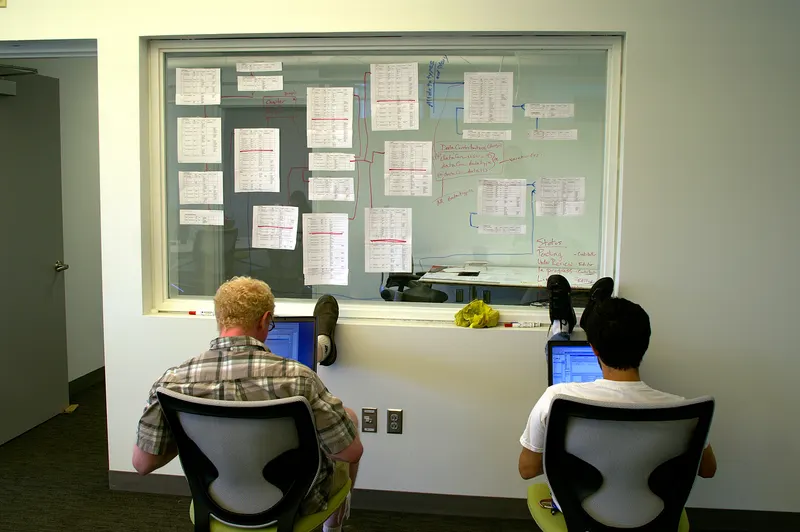
Mapping means we sit with the people who do the work and chart each process end to end: what triggers it, every step and decision, which tool or document each step touches, who hands off to whom, and how long items sit waiting between steps. The waiting is usually the revelation — in most SMEs, work spends far more time sitting in queues and inboxes than being worked on.
The map exposes three kinds of findings:
Reports nobody reads, approvals that approve everything, forms that duplicate other forms. Deleting a step costs nothing and can never break.
Decisions that only feel like judgment calls but actually follow rules everyone can state — those rules become the automation's logic.
The genuine mechanical work: notifications, data transfer between systems, document generation, reminders, status updates.
If you want a self-serve version of this thinking before hiring anyone, our plain-English guide to business process automation covers the framework.
Automating a broken process only produces mistakes faster, so mapping always comes before tooling.
Appointment booking by phone-and-email ping-pong is the classic time sink. The automated version: customers pick from your real availability on a booking page synced to Outlook or Google Workspace calendars, confirmations and reminders go out automatically, cancellations release the slot, and every booking creates or updates the customer's record. Reception stops being a scheduling switchboard. The complete workflow is laid out in our appointment scheduling automation guide.
Onboarding is a checklist wearing a trench coat — which makes it ideal automation material. For a new client: the signed agreement triggers a welcome email, an intake form, internal task assignments, a kickoff scheduling link and a folder structure, in order, without anyone remembering to do it. For a new employee: accounts requested, equipment ordered, first-week schedule issued. Inconsistent onboarding is usually a company's first broken promise to a new customer; automation makes the promise mechanical. See customer onboarding automation for steps and pitfalls.
Purchases, discounts, time off, contract terms — approvals stall because requests travel by hallway conversation and get forgotten. Automated approvals give every request a form, a route and a clock: the request goes to the right approver based on amount or type, waits a defined time, then escalates instead of dying quietly. Decisions get logged, so "who approved this?" has an answer.
Quotes, contracts, work orders and invoices assembled by copy-paste from the last customer's file — with the last customer's name occasionally surviving into the new one. Automated document flows generate paperwork from templates filled with CRM data, route it for signature, file the signed copy, and trigger the next step, such as an invoice draft in QuickBooks. Input: a deal marked won. Output: a correct, signed, filed agreement and a started project, with no retyping anywhere.
Scheduling, onboarding, approvals and documents follow repeatable paths, which is why they automate well.
We are tool-agnostic and start from what you already own. Many workflows live inside software you already pay for — modern CRMs and accounting platforms carry serious automation features that mostly go unused. Gaps between systems get bridged with a Zapier-style integration platform. Deeper connections — accounting sync directions, error handling between systems — belong to our app integrations practice, and workflows that center on sales pipelines usually pair with CRM setup. Where a step involves drafting or classifying rather than routing, an AI-assisted step from our AI workflow automation service can slot into the same flow.
The best tool is often the one you already pay for and have never switched on.
Conversations with the people doing the work, not just the org chart.
The end-to-end chart of each target process — steps, tools, handoffs, wait times — reviewed with your team until it matches reality.
A written plan naming what gets deleted, simplified and automated, in build order, with the logic of every automated decision spelled out for your approval.
Built and tested in stages against real cases, launched one process at a time — never a big-bang cutover.
Role-based training, plain-English documentation, and full ownership of accounts and workflows transferred to your business. Support after that is available, not obligatory.
If you are not yet sure which processes deserve this treatment, the automation audit is the smaller first step: it produces the ranked shortlist this service then executes.
Processes go live one at a time, tested against real cases, with full ownership handed to your team.
The people who actually run the process today are the most useful thing to bring.
The form goes to our Dallas team and we reply within one business day to set up a discovery call. On that call we pick one process and pull it apart together; you will leave with at least one improvement worth making whether or not you hire us.
Describe the repetitive work in your business. On the call we map it step by step and show you what an automated version would look like — in plain English.
Software executes a process; it cannot design one. Most failed automation purchases skipped the mapping step and faithfully automated a mess. We chart how work really moves, remove the steps that should not exist, get your team to agree on the rules — and only then choose tools, which are often ones you already own.
Usually the core repeats more than it feels like it does — what varies is the exceptions. We automate the stable backbone, design explicit exit points where a person takes over for the unusual cases, and build workflows your trained staff can adjust. If a process genuinely has no repeatable core, we tell you it is a bad candidate.
Adoption is designed in, not hoped for. The people who run the process today help map and shape it, which surfaces the practical objections early. The automation removes their most-hated chores rather than adding new screens, training happens in their real work context, and one process launches at a time so nobody's week is turned upside down.
A visual chart of each target process — triggers, steps, decision points, tools, handoffs and wait times — plus a written findings list: steps to delete, rules to standardize, and automation candidates in recommended build order. It is a document you keep and can act on with anyone, not a slide deck that only makes sense while we are in the room.
Yes, by design. Rules cover the routine cases — under a threshold, standard terms — and anything outside them routes to a named person with context attached. Escalation timers stop requests from dying in an inbox. The goal is not to remove judgment; it is to stop wasting judgment on requests a rule can answer.
Pick something frequent, rule-based and painful, where the fix is visible within weeks — scheduling and onboarding are common first wins. First projects should build trust in the approach, not test its limits. Our audit ranks your candidates by impact against effort, so the sequencing decision rests on evidence instead of enthusiasm.
A structured automation audit for Dallas SMEs — we map tasks, time, tools and handoffs, then deliver written findings ranked by impact and effort. Start here.
ExploreCRM setup and integration for small businesses — choosing the right system, migrating and cleaning data, automating follow-up, connecting email and phones.
ExploreWe connect the business apps you already use — CRM, email, calendar, accounting, e-commerce and phones — with one source of truth and real error handling.
Explore
A plain-English guide to business process automation for SMEs — what to automate first, how triggers and actions work, and where humans stay in the loop.

A complete workflow guide to appointment scheduling automation for small businesses — booking links, reminders, reschedules, no-show handling and what stays human.

How to automate customer onboarding — welcome sequences, data collection, kickoff scheduling and progress tracking — plus the mistakes that make it feel cold.
Describe the three most repetitive jobs in your business. We will map them and show you what an automated version looks like.